
188 lines
7.0 KiB
Markdown
188 lines
7.0 KiB
Markdown
# 引言
|
||
|
||
tb上买过教育版,结果用了一年多就封了,我记得之前用过ja-netfilter,用的是激活码,但是看起来直接替换的这种解决方案不太靠谱,现在是使用jetbra.in激活服务器激活,但是如果断网条件下,或者某一天这个网站down了,就没办法了,尝试过通过fiddler拦截激活服务器的响应,发现相同请求所获得的响应是不同的,加密算法也搞不懂,power.conf也看不懂,用着就不放心,还是社区版搞起吧,毕竟社区版也够用了。这里也是从52大神那里作为参考,想到的另一种方案,此方法仅供技术研究和讨论,切勿用于商业用途,否则后果自负。
|
||
|
||
经测试idea,datagrip,clion均过许可
|
||
|
||
# 版本
|
||
|
||
idea 2024.1.3
|
||
|
||
# 准备工作
|
||
|
||
jadx
|
||
idea
|
||
arthas
|
||
jdk
|
||
|
||
# 思路
|
||
|
||
## 找到窗口
|
||
|
||
|
||

|
||
|
||
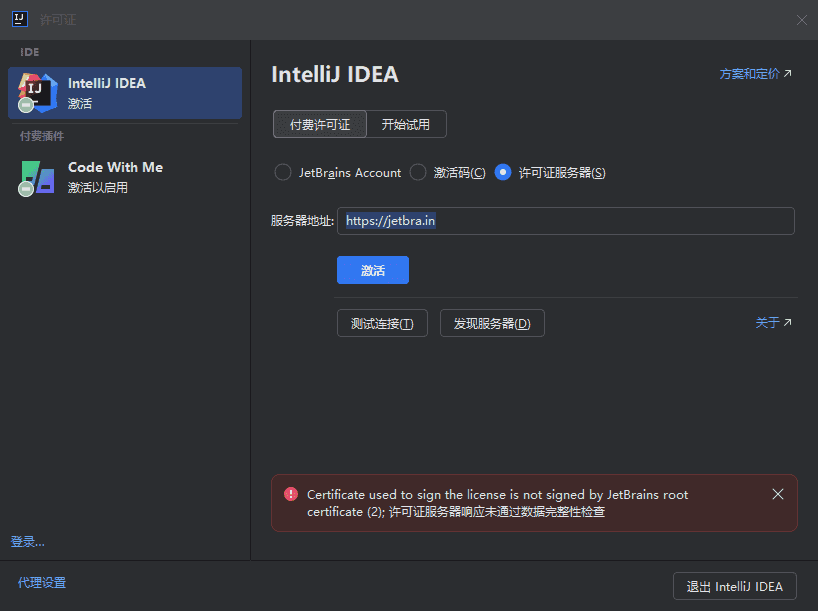
通过arthas获取awt的窗口`$ ognl '@java.awt.Window@getWindows()'`,
|
||
尝试关闭窗口`ognl '@javax.swing.JDialog@getWindows()[3].dispose()'`
|
||
|
||
发现idea并没有完全退出,如果直接手动点退出的话,程序会结束
|
||
|
||
## 找到类名
|
||
|
||
上文中找到窗口了,类名其实也就出来了,但是如何判断`com.intellij.openapi.ui.impl.DialogWrapperPeerImpl$MyDialogWrapperImpl`具体在哪个包里,还是有些困难,通过`sc -d -f com.intellij.openapi.ui.impl.DialogWrapperPeerImpl`并没有找到,这里就是猜,猜到app-client.jar文件
|
||
|
||
## 分析代码
|
||
|
||
找到注入位置这里也踩了很多坑,比如说关闭了不该关闭的窗口,但是开发过java的应该都熟悉get/set方法,那么在setTitle时检查名称是不是就可以判断出这个窗口是不是应该关闭了?
|
||
|
||
## 写代码
|
||
|
||
### 依赖
|
||
|
||
```xml
|
||
<dependencies>
|
||
<dependency>
|
||
<groupId>org.javassist</groupId>
|
||
<artifactId>javassist</artifactId>
|
||
<version>3.28.0-GA</version>
|
||
</dependency>
|
||
</dependencies>
|
||
```
|
||
|
||
### 代码
|
||
|
||
```java
|
||
package org.example;
|
||
|
||
|
||
import javassist.*;
|
||
|
||
import java.io.*;
|
||
import java.util.Enumeration;
|
||
import java.util.jar.*;
|
||
|
||
public class ModifyDialogWrapperPeerImpl {
|
||
public static void main(String[] args) {
|
||
try {
|
||
ClassPool pool = ClassPool.getDefault();
|
||
String jarPath = "G:\\test\\app-client-old.jar"; // jar文件路径
|
||
String exportPath = "G:\\test\\app-client.jar"; // jar文件路径
|
||
|
||
pool.insertClassPath(jarPath);
|
||
CtClass ctClass = pool.get("com.intellij.openapi.ui.impl.DialogWrapperPeerImpl"); // 类名
|
||
CtMethod setTitleMethod = ctClass.getDeclaredMethod("setTitle",
|
||
new CtClass[]{pool.get("java.lang.String")}); // 方法名
|
||
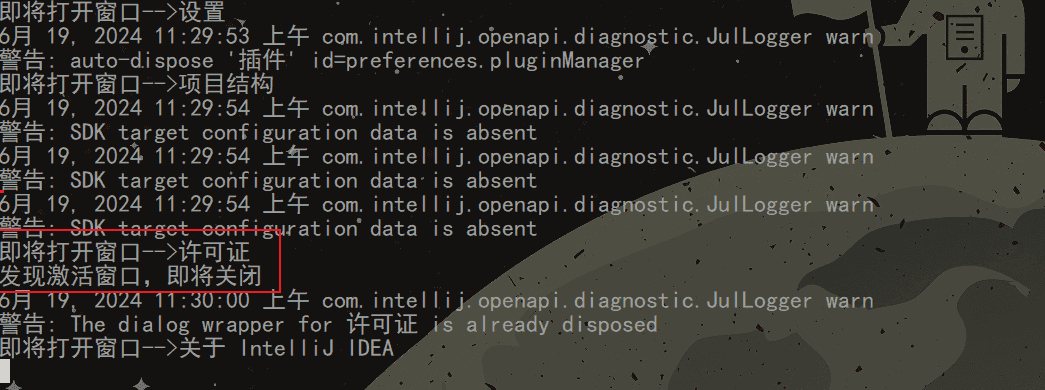
setTitleMethod.insertBefore("{ System.out.println(\"即将打开窗口-->\"+$1);" +
|
||
"boolean isLicenseWindow = false;" +
|
||
"if($1.indexOf(\"许可证\")>-1) {isLicenseWindow=true; this.dispose();}" +
|
||
"if($1.indexOf(\"Licenses\")>-1) {isLicenseWindow=true; this.dispose();}" +
|
||
"if(isLicenseWindow)System.out.println(\"发现激活窗口,即将关闭\");" +
|
||
" }"); // 注入的代码
|
||
String tempDir = "G:\\test\\modified_classes";
|
||
ctClass.writeFile(tempDir);
|
||
ctClass.detach();
|
||
|
||
updateJarFile("G:\\test\\app-client-old.jar", tempDir, exportPath);
|
||
System.out.println("Method modified successfully.");
|
||
} catch (NotFoundException | CannotCompileException | IOException e) {
|
||
e.printStackTrace();
|
||
}
|
||
}
|
||
|
||
public static void updateJarFile(String originalJarPath, String modifiedClassesPath, String outputJarPath) throws IOException {
|
||
JarFile originalJar = new JarFile(originalJarPath);
|
||
FileOutputStream fos = new FileOutputStream(outputJarPath);
|
||
JarOutputStream jos = new JarOutputStream(fos);
|
||
|
||
// 复制原始JAR中的所有文件到新的JAR中,跳过要修改的类文件
|
||
Enumeration<JarEntry> entries = originalJar.entries();
|
||
while (entries.hasMoreElements()) {
|
||
JarEntry entry = entries.nextElement();
|
||
if (!entry.getName().equals("com/intellij/openapi/ui/impl/DialogWrapperPeerImpl.class")) { // 跳过要修改的类文件
|
||
InputStream is = originalJar.getInputStream(entry);
|
||
jos.putNextEntry(new JarEntry(entry.getName()));
|
||
byte[] buffer = new byte[1024];
|
||
int bytesRead;
|
||
while ((bytesRead = is.read(buffer)) != -1) {
|
||
jos.write(buffer, 0, bytesRead);
|
||
}
|
||
is.close();
|
||
jos.closeEntry();
|
||
}
|
||
}
|
||
originalJar.close();
|
||
|
||
// 添加修改后的类文件到新的JAR中
|
||
File modifiedClassesDir = new File(modifiedClassesPath);
|
||
addModifiedFilesToJar(modifiedClassesDir, "", jos);
|
||
|
||
jos.close();
|
||
}
|
||
|
||
private static void addModifiedFilesToJar(File source, String parent, JarOutputStream jos) throws IOException {
|
||
File[] files = source.listFiles();
|
||
for (File file : files) {
|
||
if (file.isDirectory()) {
|
||
addModifiedFilesToJar(file, parent + file.getName() + "/", jos);
|
||
} else {
|
||
FileInputStream fis = new FileInputStream(file);
|
||
jos.putNextEntry(new JarEntry(parent + file.getName()));
|
||
byte[] buffer = new byte[1024];
|
||
int bytesRead;
|
||
while ((bytesRead = fis.read(buffer)) != -1) {
|
||
jos.write(buffer, 0, bytesRead);
|
||
}
|
||
fis.close();
|
||
jos.closeEntry();
|
||
}
|
||
}
|
||
}
|
||
}
|
||
```
|
||
|
||
执行完成后,需要把生成的文件替换回去。
|
||
|
||
# 测试
|
||
|
||

|
||
|
||
|
||
# 注意
|
||
|
||
这里需要注意的是,上文代码中的Licenses和许可证是写死的,如果使用其他语言的语言包,需要手动修改一下。
|
||
|
||
jar文件路径
|
||
idea == > app-client.jar
|
||
clion ==> app-client.jar
|
||
datagrip ==> app.jar
|
||
操作前需要先备份一下
|
||
|
||
经过测试,MyDialog是所有子窗口的类,如果一股脑全部关闭,设置,新建,打开,关于,你都将无法看到。
|
||
但是用了这个方法,注册窗口也是无法显示出来的
|
||
|
||
|
||
这种方法不能绕过插件的激活
|
||
|
||
IntelliJ IDEA 2025.2 (Ultimate Edition) 可以配合ja-netfilter使用,因为是不是提示 'Ultimate'功能需要许可证
|
||
|
||
|
||
# 工程实例
|
||
|
||
|
||
|
||
|
||
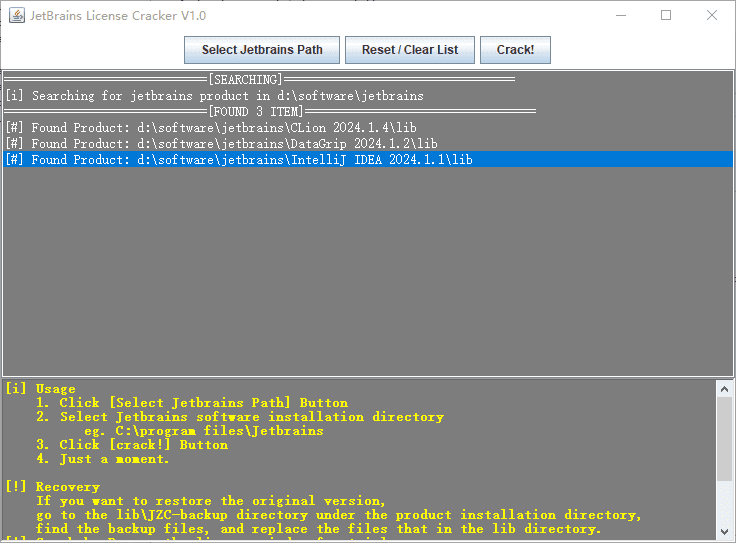
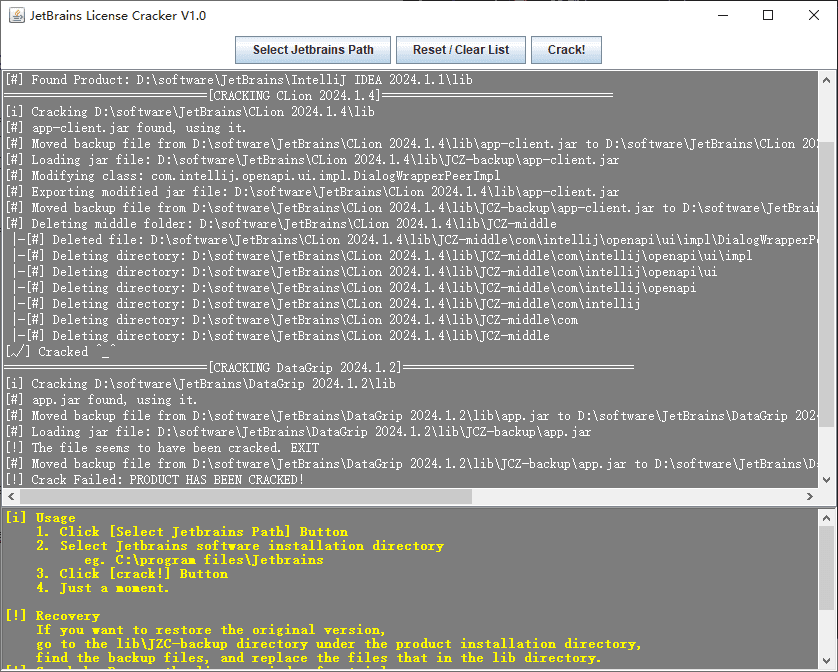
[jc.zip](https://www.zunmx.top/usr/uploads/2024/06/1200008417.zip)
|
||
|
||
运行:
|
||
|
||
```bash
|
||
java -jar jetbrains_cracker-1.0-SNAPSHOT-jar-with-dependencies.jar
|
||
```
|
||
|
||
⚠ 仅以开源和学习精神,切勿用于商业用途。
|
||
|
||
# 结语
|
||
|
||
|
||
请支持正版,仅供研究学习使用,请勿用于非法用途。
|